Release Log
New in Easy Scribe: Confluence export, sharper PDF/DOCX exports, and a refreshed editor experience
Hey everyone,
We’ve shipped a new batch of updates to make Easy Scribe feel more at home in your existing tools, look better on export, and stay smoother to edit in day-to-day work.
Here’s what’s new:
Export to Confluence so your Easy Scribe docs can live alongside the rest of your knowledge base. You can read the documentation here.
Improved PDF exports that are much closer to what you see in the editor.
DOCX exports with images included, ready for Word or Google Docs.
A refined editor experience that keeps your content front and centre.
Minor bug fixes and polish across editing and exports.
Export Easy Scribe documents straight into Confluence
Many teams already use Confluence as their source of truth for SOPs, runbooks, internal documentation and project docs. Easy Scribe now meets you there.
You can export any Easy Scribe document as a Confluence page in a few clicks. Behind the scenes, we send your title, body content, and images into Confluence so you do not have to copy and paste.

How it works
Once your document is open in Easy Scribe:
Click the purple share/export button in the editor.
Choose Export to Confluence.
If it is your first time, connect your Confluence site on the Atlassian consent screen, and then you will be redirected back to Easy Scribe.
Pick your Confluence site and space, then choose whether to:
Create a new page, or
Update an existing page.
(Optional):
Set a parent page ID if you want to nest the page.
Set a title override to rename the page in Confluence.
Hit Export, then review the page from your Confluence space.
This keeps your real workflows and your Confluence knowledge base in sync. You can record a process, generate the guide in Easy Scribe, tweak it, then publish it to the space your team already uses without leaving the app.
PDF exports that look closer to your document
PDF is still the simplest way to:
Share a guide with a client or vendor
Attach instructions to an email
Store an SOP snapshot in an audit folder
Previously, PDFs from Easy Scribe could feel a bit detached from what you saw in the editor. With this update, PDF exports now mirror your document layout much more closely.
If you rely on PDF for compliance packs, onboarding bundles, or sharing outside your tools, this should make those exports feel less like a compromise.
DOCX exports with images included
Easy Scribe already supports exporting to DOCX so you can open your documents in Word or Google Docs for further editing.
The new release brings your screenshots along for the ride.
When you export to DOCX now, the images from your Easy Scribe document are embedded in the file. That means:
Your step-by-step instructions stay visual, even after you move into Word.
Brand or legal review can happen directly on a fully visual document.
You can reuse the same screenshots for training packs or manuals without regrabbing them.
For teams that still route everything through Word templates, this makes Easy Scribe a better first step rather than a parallel track.
A cleaner editor that keeps you in flow
The editor is where most of your time in Easy Scribe is spent, so we gave it a bit of extra attention.
The updated experience keeps the document body front and center, with a layout that makes it easier to scan and adjust long guides. You still have the same core tools in the formatting toolbar:
Headings (H1 to H4) to structure your sections
Bold, italic, and underline for emphasis
Bulleted and numbered lists for steps
Links for internal and external references
You can also drag and drop images to move them between sections, and autosave continues to keep your changes safe while you edit.
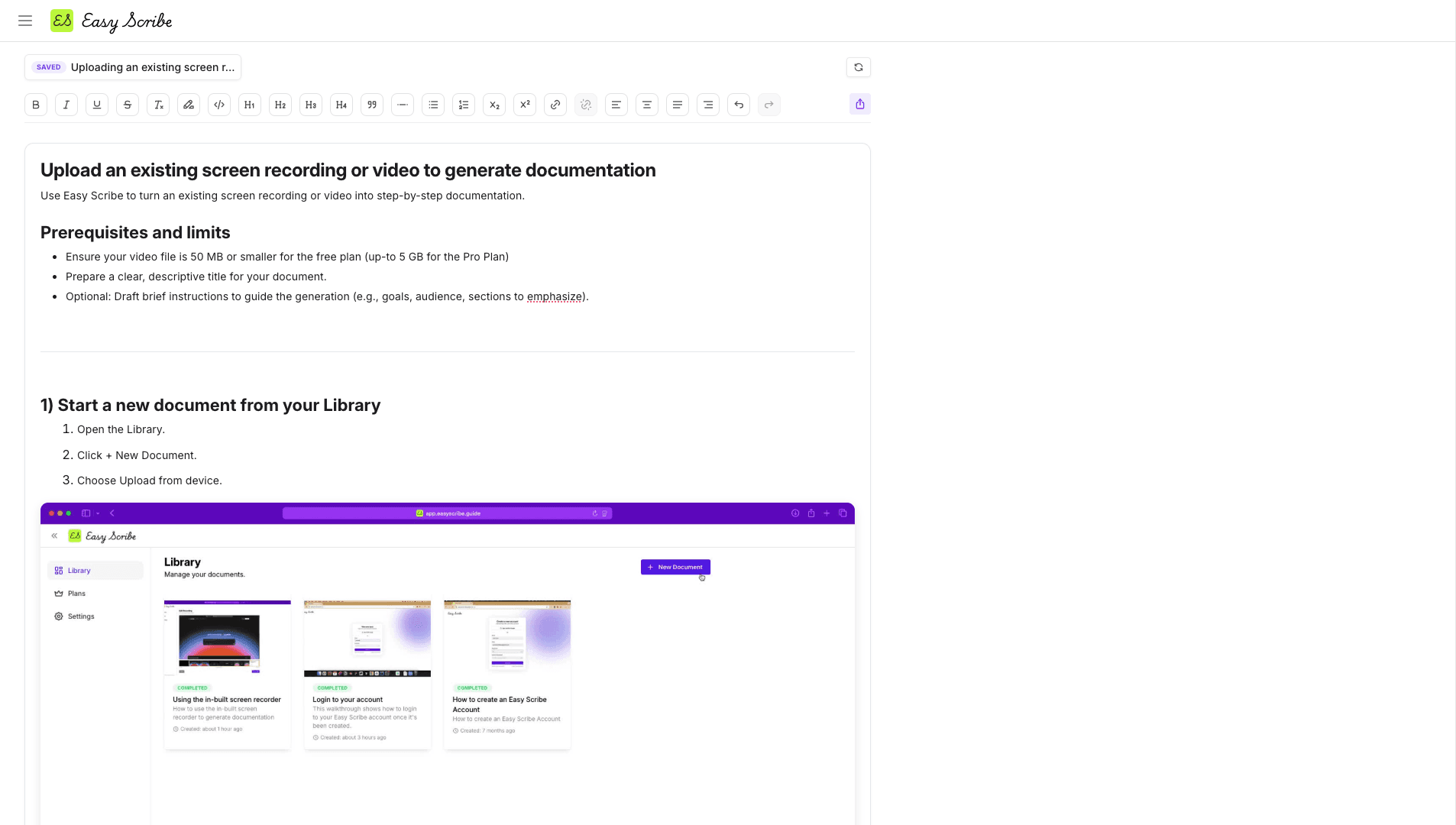
The visual refresh is about reducing friction. Text is easier to read, spacing feels more deliberate, and the export controls are easier to find when you are ready to ship a document.
Small fixes that make a big difference
Alongside the headline features, we shipped a handful of smaller improvements and bug fixes, including:
Smoother behaviour around autosave and status indicators in the editor
More reliable document exports, especially for longer guides
General polish across the app
Nothing flashy on its own, but taken together, they should make Easy Scribe feel a bit more dependable every time you open it.
Try the new workflow
If you already use Confluence as your knowledge base, this is a good time to test an end-to-end flow:
Record a real workflow with Easy Scribe.
Generate and refine the document in the editor.
Export once to PDF for a static snapshot and once to Confluence for your live playbook.
You will end up with a visual, step-by-step guide that lives where your team already works, plus a PDF you can share with anyone.
We would love to hear how these updates fit into your workflow and what you would like to see next.

Easy Scribe
Rich documentation, walkthroughs, and guides from screen recordings.
Quick links
RESOURCES
© 2025 Easy Scribe. All Rights Reserved