Article
What 6 Documentation Tools Actually Cost: Free Tier vs. Paid Reality (July 2026)
Most documentation tools advertise a free tier. Most of those free tiers do not let you export a document. If your goal is to actually produce a PDF, a Markdown file, or a Word doc from captured steps, you need to understand exactly what each tool gives you at $0 before you discover the wall at checkout.
We compared six tools in the process documentation category: Easy Scribe, Scribe, Tango, Guidde, Guidejar, and Glitter AI. Every price and feature gate below was checked against each tool's published pricing page or help documentation in July 2026.
What the Free Tiers Actually Include
Here is what you can and cannot do without paying:
Scribe offers unlimited guides on its free plan, but it is web-only capture via a Chrome extension. What you get is web-only capture through the Chrome extension, with no exports (PDF, HTML, Markdown). You can share by link or embed, but you cannot download a file.
Tango provides a free plan with browser capture and up to 10 Free Admins in a Workspace, and can store up to 5 workflows in the Team Library. There is no file export on the free tier.
Guidde has a free plan that includes up to 25 how-to videos. Output is watermarked, and there is no file export.
Guidejar lets you create up to 5 guides on the free plan. Guides carry a watermark, and exports require a paid tier.
Glitter AI has a free tier, but Glitter AI free tier includes watermarked output and limited recordings per month. No PDF, HTML, or Markdown exports are available until you pay.
Easy Scribe offers a free tier with unlimited documents, no upload size limits, no recording length cap, full export to PDF, Markdown, HTML, and Word (DOCX), interactive walkthroughs, multilingual output, and mobile recording support. No watermark and no credit card required.
The Full Comparison Table
Feature | Easy Scribe | Scribe | Tango | Guidde | Guidejar | Glitter AI |
|---|---|---|---|---|---|---|
Requires extension/install | No | Chrome extension | Chrome extension | Chrome extension | Chrome extension | Desktop app or Chrome extension |
Free tier exports | PDF, MD, HTML, DOCX | None (link only) | None | None (watermarked) | None (watermarked) | None (watermarked) |
Free tier doc limit | Unlimited | Unlimited | 5 workflows | 25 videos | 5 guides | Limited |
Free tier watermark | No | No | N/A (no export) | Yes | Yes | Yes |
Interactive walkthroughs on Free | Yes | No | No (Enterprise) | No | No | No |
Mobile recording | Yes | No | No | Business+ | No | Upload only |
Entry paid plan (per user/mo, annual) | $9.99 | $23 (Pro Personal) | $15 (Team, 3+ seats) | $39 (Business) | See pricing page | $15 (Team, 5 seats) |
PII redaction | Pro ($9.99) | Enterprise | Enterprise | Enterprise | Business | Paid add-on |
Multilingual output | Free | Enterprise | Enterprise | Enterprise | Pro | Pro (credits) |
Confluence export | Pro ($9.99) | No native | No native | No native | No native | No native |
What This Means If You Are Evaluating Tools
If you need to produce actual documents
Four of the five competitors require a paid plan before you can export anything. Easy Scribe's free tier includes PDF, Markdown, HTML, and Word exports with no document limit and no watermark.
If you work in a regulated environment
PII redaction is gated behind Enterprise pricing on Scribe, Tango, and Guidde. Enterprise is custom with auto-redaction of PII/PHI on Scribe. Tango reserves its most valuable enterprise features for custom-priced Enterprise contracts, including SAML/SCIM SSO, in-app guided walkthroughs (Nuggets), automatic PII blurring. On Glitter AI, blur sensitive data locally on the desktop app is available as a paid add-on. Easy Scribe includes PII redaction across text and screenshots on the Pro plan at $9.99/user/month. The gap between $9.99 and "talk to sales" is wide.
If your IT team blocks browser extensions
Scribe, Tango, Guidde, Guidejar, and Glitter AI all require a Chrome extension or desktop app to capture workflows. If your IT policy blocks extensions, those tools are not options. Easy Scribe is browser-based with no install or extension required.
If you need documentation in multiple languages
Enterprise is required for multi-language translation on Guidde. Scribe operates in English only outside Enterprise. Tango gates multilingual features behind Enterprise as well. Easy Scribe includes multilingual output on the free tier.
Entry-Level Paid Plan Pricing
Here is what each tool charges once you step past free:
Easy Scribe Pro: $9.99/user/month. Adds Confluence export, PII redaction, custom branding, password-protected exports, AI voice narration for walkthroughs, unlimited team workspace members, faster processing, and priority support.
Scribe Pro Personal: $25/user/mo (monthly). Pro Personal ($23/seat/mo annual = $276/year). Pro Team is $13/seat/month annual with a 5-seat minimum.
Tango Pro: Pro Workspaces of 1-2 members will cost $22 per user per month on an annual plan. Pro Workspaces with 3 or more members will cost $15 per user per month on an annual plan.
Guidde Business: $39/month per creator (annual billing). Pro is $29/mo vs $19/mo billed annually.
Guidejar: Multiple paid tiers. Straightforward pricing: $20/month, or $16/month if you pay annually. (This refers to Glitter AI's comparison page; Guidejar's own pricing page lists Pro, Plus, and Business tiers.)
Glitter AI: Pro starts at $16 per seat per month (annual billing), Team starts at $12 per seat per month (annual) for 5 or more seats.
Why Easy Scribe's Pricing Works Differently
Click-capture tools like Scribe, Tango, Guidde, Guidejar, and Glitter AI maintain browser extensions or desktop apps that need constant updates as Chrome and Edge change. They have higher per-user infrastructure costs because they are capturing click streams in real time.
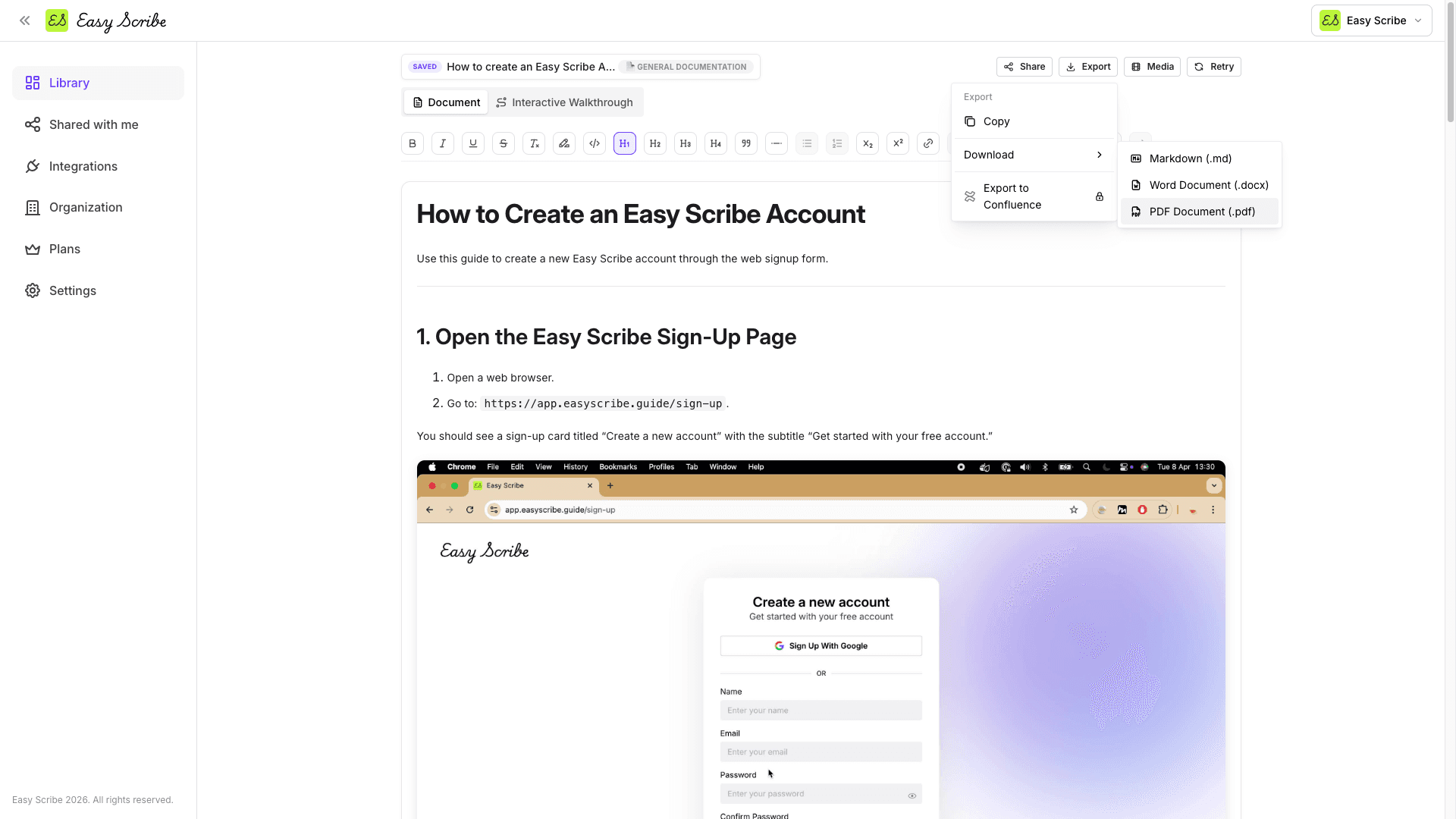
Easy Scribe processes screen recordings instead. You record a task with the in-app browser recorder (or upload an existing video), and Easy Scribe generates an ordered, captioned guide with screenshots pulled from the recording. The infrastructure cost per free user is lower, so the free tier can be genuinely usable.
How to Get Started
Sign up at easyscribe.guide -- no credit card, no extension.
Record a task with the in-app recorder or upload an existing video.
Add a title, pick a document template (General Documentation, SOP, User Guide, Acceptance Criteria, Tutorial, Onboarding Guide, Release Notes, or Troubleshooting Guide) and output language.
Easy Scribe generates an ordered, step-by-step guide with contextual screenshots.
Refine in the rich text editor, then export to PDF, Markdown, HTML, or Word.
The entire flow is free. If you need Confluence publishing, PII redaction, or custom branding, Pro is $9.99/user/month.
Frequently Asked Questions
Can I really export documents on the free tier?
Yes. PDF, Markdown, HTML, and Word (DOCX). No watermark. No document limit. No credit card required.
Why is Easy Scribe cheaper than competitors?
No browser extension to maintain. No enterprise sales team to fund. Lower infrastructure cost per user means the free tier is sustainable and Pro is $9.99/user/month.
Does Easy Scribe integrate with Confluence?
Yes, on the Pro plan ($9.99/user/month). It uses a native OAuth connection to your Atlassian site. You can create new pages or update existing ones by Page ID, with parent page nesting and title override. Confluence is our only direct publishing integration today. For other platforms, export as Markdown or HTML and import.
What am I giving up by choosing Easy Scribe over Scribe or Tango?
Enterprise features: SOC 2 compliance, SSO, audit logging, and admin policy controls. If your organization requires those, Easy Scribe is not the right fit today. If you need MP4 video output or talking-head tutorials, Guidde is stronger in that area. Be honest about what you actually need.
How does the free tier compare to paying for Pro?
Free includes everything except: Confluence publishing, PII redaction, custom branding on exports, password-protected exports, AI voice narration for walkthroughs, team workspace beyond 2 users, faster processing queue, and priority support. Pro is $9.99/user/month with 17% savings on annual billing.
Most documentation tools advertise a free tier. Most of those free tiers do not let you export a document. If your goal is to actually produce a PDF, a Markdown file, or a Word doc from captured steps, you need to understand exactly what each tool gives you at $0 before you discover the wall at checkout.
We compared six tools in the process documentation category: Easy Scribe, Scribe, Tango, Guidde, Guidejar, and Glitter AI. Every price and feature gate below was checked against each tool's published pricing page or help documentation in July 2026.
What the Free Tiers Actually Include
Here is what you can and cannot do without paying:
Scribe offers unlimited guides on its free plan, but it is web-only capture via a Chrome extension. What you get is web-only capture through the Chrome extension, with no exports (PDF, HTML, Markdown). You can share by link or embed, but you cannot download a file.
Tango provides a free plan with browser capture and up to 10 Free Admins in a Workspace, and can store up to 5 workflows in the Team Library. There is no file export on the free tier.
Guidde has a free plan that includes up to 25 how-to videos. Output is watermarked, and there is no file export.
Guidejar lets you create up to 5 guides on the free plan. Guides carry a watermark, and exports require a paid tier.
Glitter AI has a free tier, but Glitter AI free tier includes watermarked output and limited recordings per month. No PDF, HTML, or Markdown exports are available until you pay.
Easy Scribe offers a free tier with unlimited documents, no upload size limits, no recording length cap, full export to PDF, Markdown, HTML, and Word (DOCX), interactive walkthroughs, multilingual output, and mobile recording support. No watermark and no credit card required.
The Full Comparison Table
Feature | Easy Scribe | Scribe | Tango | Guidde | Guidejar | Glitter AI |
|---|---|---|---|---|---|---|
Requires extension/install | No | Chrome extension | Chrome extension | Chrome extension | Chrome extension | Desktop app or Chrome extension |
Free tier exports | PDF, MD, HTML, DOCX | None (link only) | None | None (watermarked) | None (watermarked) | None (watermarked) |
Free tier doc limit | Unlimited | Unlimited | 5 workflows | 25 videos | 5 guides | Limited |
Free tier watermark | No | No | N/A (no export) | Yes | Yes | Yes |
Interactive walkthroughs on Free | Yes | No | No (Enterprise) | No | No | No |
Mobile recording | Yes | No | No | Business+ | No | Upload only |
Entry paid plan (per user/mo, annual) | $9.99 | $23 (Pro Personal) | $15 (Team, 3+ seats) | $39 (Business) | See pricing page | $15 (Team, 5 seats) |
PII redaction | Pro ($9.99) | Enterprise | Enterprise | Enterprise | Business | Paid add-on |
Multilingual output | Free | Enterprise | Enterprise | Enterprise | Pro | Pro (credits) |
Confluence export | Pro ($9.99) | No native | No native | No native | No native | No native |
What This Means If You Are Evaluating Tools
If you need to produce actual documents
Four of the five competitors require a paid plan before you can export anything. Easy Scribe's free tier includes PDF, Markdown, HTML, and Word exports with no document limit and no watermark.
If you work in a regulated environment
PII redaction is gated behind Enterprise pricing on Scribe, Tango, and Guidde. Enterprise is custom with auto-redaction of PII/PHI on Scribe. Tango reserves its most valuable enterprise features for custom-priced Enterprise contracts, including SAML/SCIM SSO, in-app guided walkthroughs (Nuggets), automatic PII blurring. On Glitter AI, blur sensitive data locally on the desktop app is available as a paid add-on. Easy Scribe includes PII redaction across text and screenshots on the Pro plan at $9.99/user/month. The gap between $9.99 and "talk to sales" is wide.
If your IT team blocks browser extensions
Scribe, Tango, Guidde, Guidejar, and Glitter AI all require a Chrome extension or desktop app to capture workflows. If your IT policy blocks extensions, those tools are not options. Easy Scribe is browser-based with no install or extension required.
If you need documentation in multiple languages
Enterprise is required for multi-language translation on Guidde. Scribe operates in English only outside Enterprise. Tango gates multilingual features behind Enterprise as well. Easy Scribe includes multilingual output on the free tier.
Entry-Level Paid Plan Pricing
Here is what each tool charges once you step past free:
Easy Scribe Pro: $9.99/user/month. Adds Confluence export, PII redaction, custom branding, password-protected exports, AI voice narration for walkthroughs, unlimited team workspace members, faster processing, and priority support.
Scribe Pro Personal: $25/user/mo (monthly). Pro Personal ($23/seat/mo annual = $276/year). Pro Team is $13/seat/month annual with a 5-seat minimum.
Tango Pro: Pro Workspaces of 1-2 members will cost $22 per user per month on an annual plan. Pro Workspaces with 3 or more members will cost $15 per user per month on an annual plan.
Guidde Business: $39/month per creator (annual billing). Pro is $29/mo vs $19/mo billed annually.
Guidejar: Multiple paid tiers. Straightforward pricing: $20/month, or $16/month if you pay annually. (This refers to Glitter AI's comparison page; Guidejar's own pricing page lists Pro, Plus, and Business tiers.)
Glitter AI: Pro starts at $16 per seat per month (annual billing), Team starts at $12 per seat per month (annual) for 5 or more seats.
Why Easy Scribe's Pricing Works Differently
Click-capture tools like Scribe, Tango, Guidde, Guidejar, and Glitter AI maintain browser extensions or desktop apps that need constant updates as Chrome and Edge change. They have higher per-user infrastructure costs because they are capturing click streams in real time.
Easy Scribe processes screen recordings instead. You record a task with the in-app browser recorder (or upload an existing video), and Easy Scribe generates an ordered, captioned guide with screenshots pulled from the recording. The infrastructure cost per free user is lower, so the free tier can be genuinely usable.
How to Get Started
Sign up at easyscribe.guide -- no credit card, no extension.
Record a task with the in-app recorder or upload an existing video.
Add a title, pick a document template (General Documentation, SOP, User Guide, Acceptance Criteria, Tutorial, Onboarding Guide, Release Notes, or Troubleshooting Guide) and output language.
Easy Scribe generates an ordered, step-by-step guide with contextual screenshots.
Refine in the rich text editor, then export to PDF, Markdown, HTML, or Word.
The entire flow is free. If you need Confluence publishing, PII redaction, or custom branding, Pro is $9.99/user/month.
Frequently Asked Questions
Can I really export documents on the free tier?
Yes. PDF, Markdown, HTML, and Word (DOCX). No watermark. No document limit. No credit card required.
Why is Easy Scribe cheaper than competitors?
No browser extension to maintain. No enterprise sales team to fund. Lower infrastructure cost per user means the free tier is sustainable and Pro is $9.99/user/month.
Does Easy Scribe integrate with Confluence?
Yes, on the Pro plan ($9.99/user/month). It uses a native OAuth connection to your Atlassian site. You can create new pages or update existing ones by Page ID, with parent page nesting and title override. Confluence is our only direct publishing integration today. For other platforms, export as Markdown or HTML and import.
What am I giving up by choosing Easy Scribe over Scribe or Tango?
Enterprise features: SOC 2 compliance, SSO, audit logging, and admin policy controls. If your organization requires those, Easy Scribe is not the right fit today. If you need MP4 video output or talking-head tutorials, Guidde is stronger in that area. Be honest about what you actually need.
How does the free tier compare to paying for Pro?
Free includes everything except: Confluence publishing, PII redaction, custom branding on exports, password-protected exports, AI voice narration for walkthroughs, team workspace beyond 2 users, faster processing queue, and priority support. Pro is $9.99/user/month with 17% savings on annual billing.

Easy Scribe
Rich documentation, walkthroughs, and guides from screen recordings.
Quick links
RESOURCES
© 2025 Easy Scribe. All Rights Reserved