Article
Creating an SOP Document: Record Once, Generate a Complete Procedure
Your team's support manual has dozens of procedures, but only a handful are current. The rest? Written months ago, stored in a shared drive nobody checks, and so tedious to recreate that nobody bothers.
You are not alone. SOP documents are living documents that require constant updates to stay useful, and an outdated SOP that doesn't reflect the current working process becomes useless. The problem isn't that teams don't create SOPs. It's that those SOPs don't stay accurate.
Easy Scribe changes this equation entirely. Record yourself performing a process once, pick the Standard Operating Procedure template, and get a structured SOP with numbered steps, contextual screenshots, and captions. When the process changes, re-record. The effort to update is the same as the effort to create.
Why Traditional SOP Creation Falls Short
Creating an SOP document by hand means performing the task, taking screenshots at every step, writing captions, formatting the document, getting it reviewed, and publishing it somewhere your team can find it. That cycle can take hours for a single procedure.
Outdated SOPs introduce risk at every touchpoint: execution stalls when a procedure doesn't match current process flow, operators substitute memory or hearsay when the SOP is wrong, and new hires onboard with obsolete guidance, reinforcing bad habits from day one.
The result is a documentation graveyard. One of the most common reasons procedure programs fail is inaccessibility: paper binders in an office, outdated PDFs on a shared drive, and disconnected spreadsheets create barriers for the people who need the information most.
How Easy Scribe Generates an SOP Document
Easy Scribe turns a screen recording into a structured SOP in four steps. No browser extension, no install. It runs entirely in your browser and can optionally be installed as a PWA from the dashboard.
Step 1: Record the process
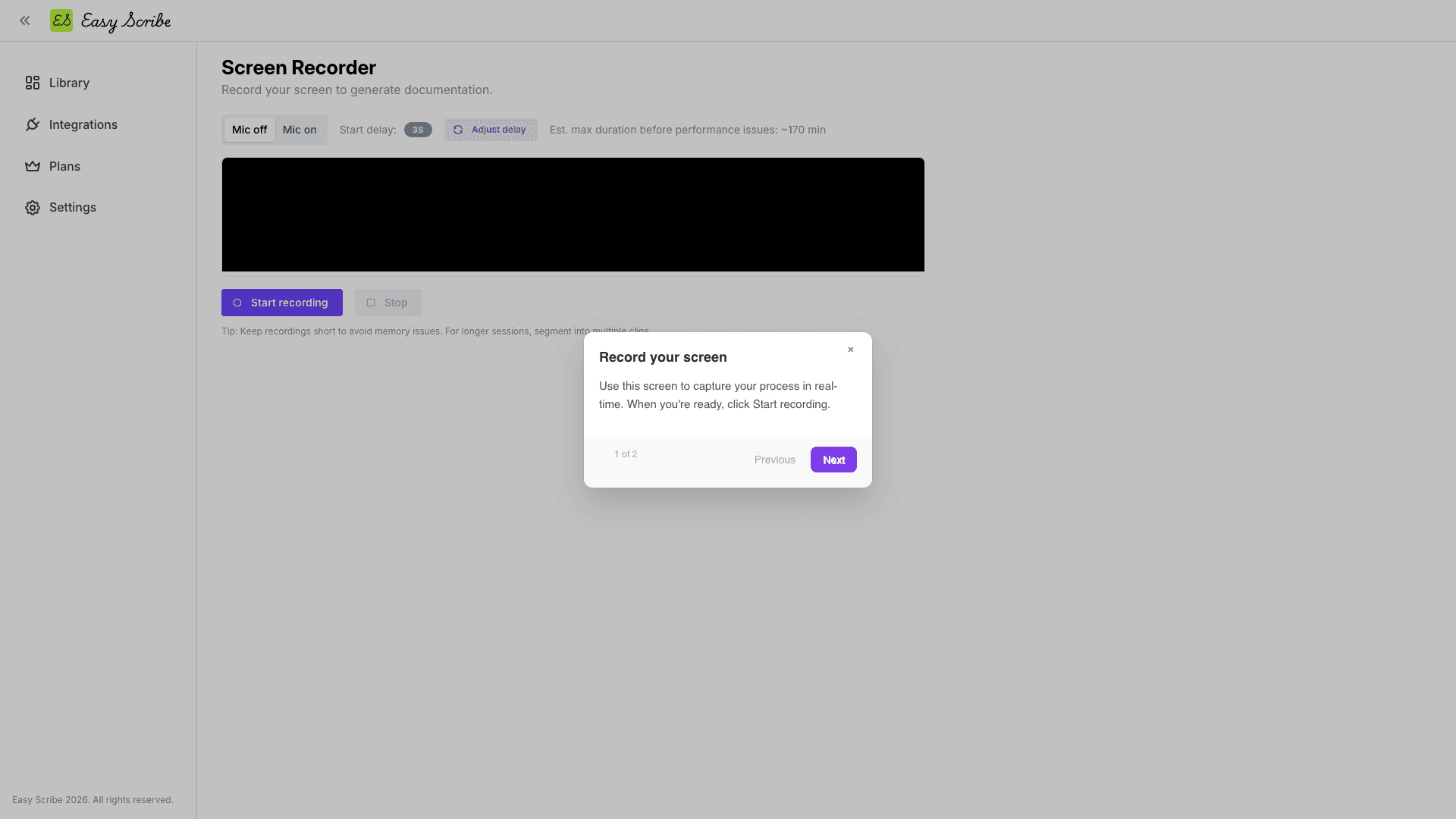
Open your Easy Scribe Library and click + New Document, then select Instant recording. Toggle the mic on and narrate as you go: "First, log into admin. Navigate to Orders. Filter by Returned..." The in-app recorder has an adjustable start delay (default 5 seconds) with a countdown and chime so you can prepare your screen.
Alternatively, upload an existing recording. Easy Scribe accepts desktop and mobile recordings with no upload size limits.
Step 2: Pick the SOP template
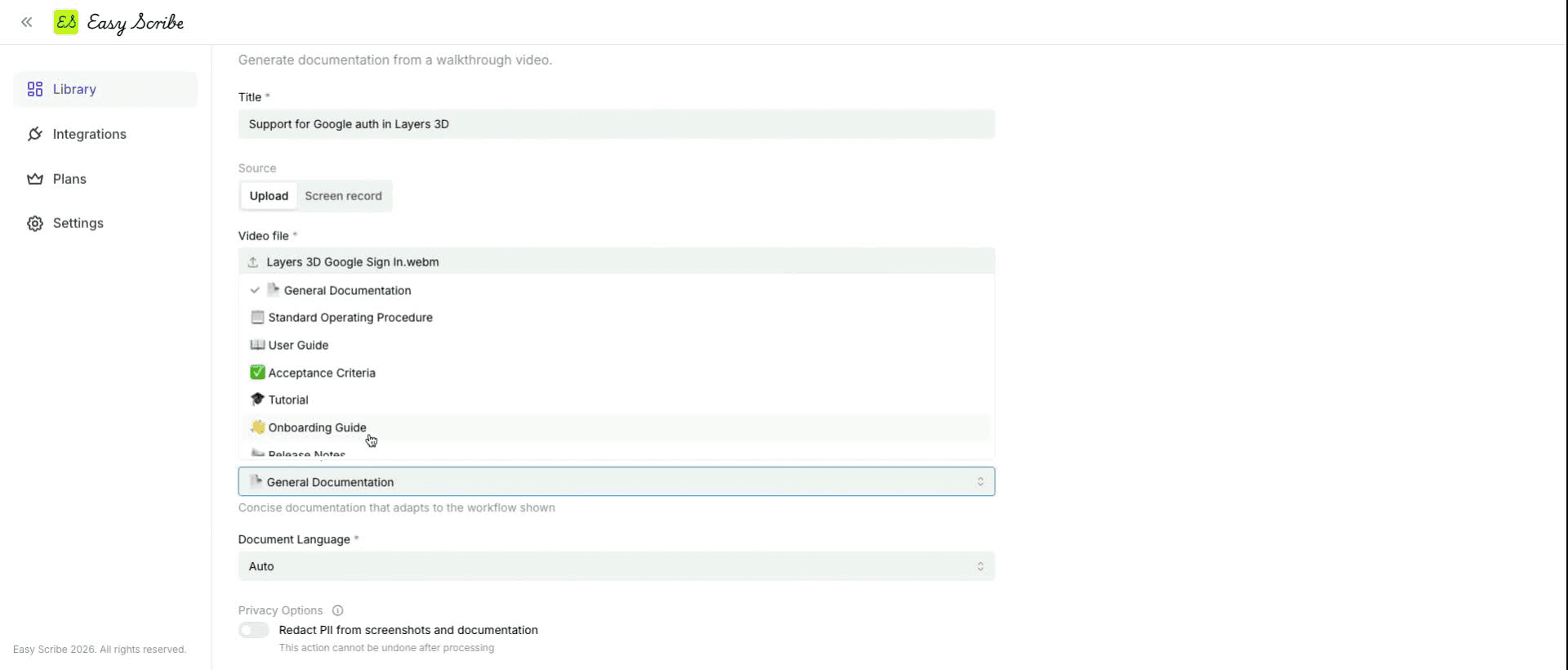
On the New Document form, enter a clear title, open the Document Template dropdown, and select Standard Operating Procedure. Set the language or leave it on Auto. Optionally add description or instructions to guide generation (audience, scope, key steps to highlight).
The available templates are:
General Documentation
Standard Operating Procedure
User Guide
Acceptance Criteria
Tutorial
Onboarding Guide
Release Notes
Troubleshooting Guide
Step 3: Generate and review
Click Create. Easy Scribe transcribes your narrated audio, extracts contextual screenshots tied to each relevant step, and produces an ordered, captioned, step-by-step SOP. The draft opens in a rich text editor where you can refine headings (H1 to H4), add bold or italic emphasis, reorder with numbered or bulleted lists, and drag-and-drop screenshots to different sections. The editor autosaves your work.
You can also add manual screenshot points using the built-in video editor before generation if you want to control exactly which frames appear.
Step 4: Export and publish
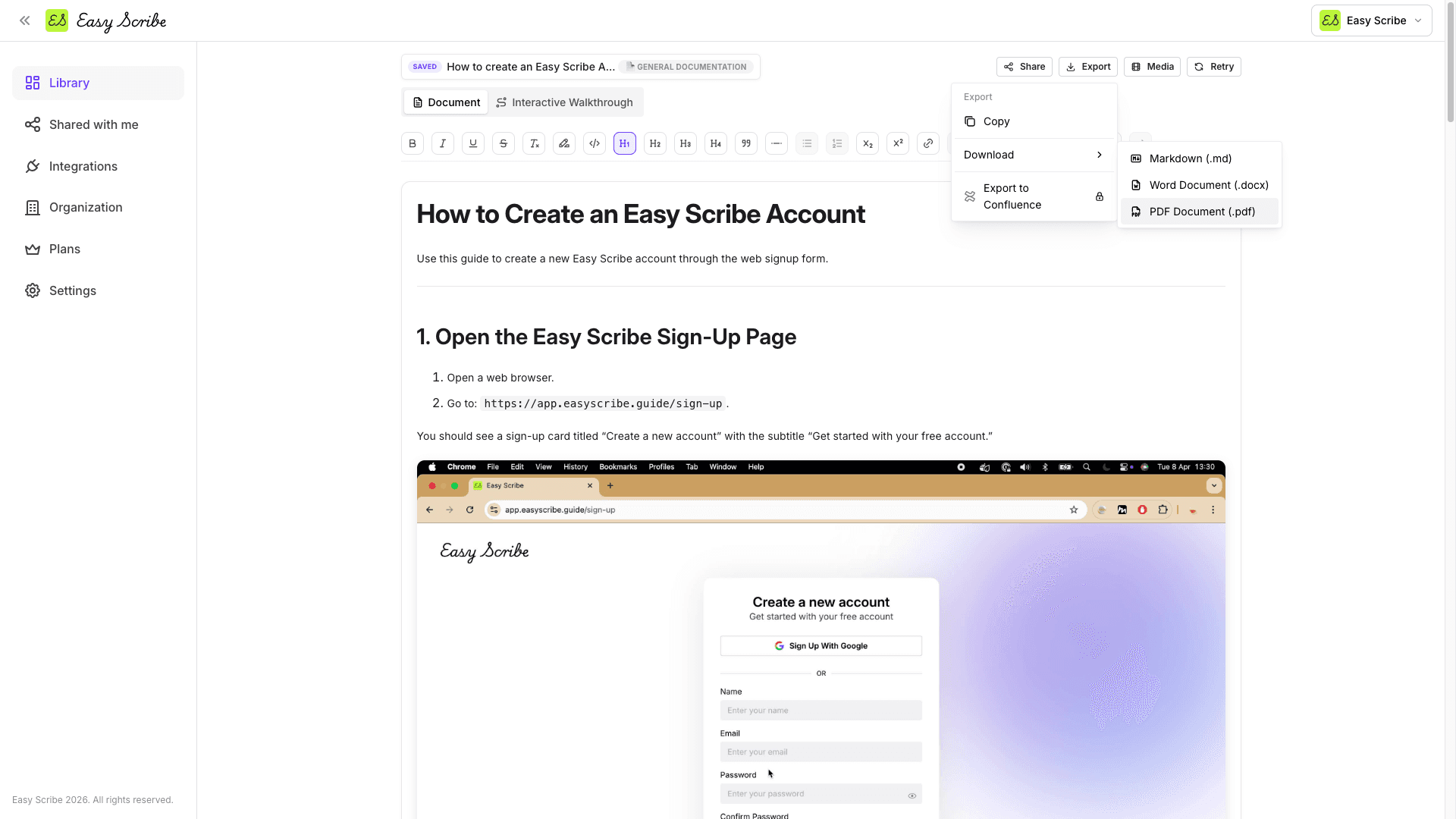
Open the Export option from the editor toolbar and choose your format:
PDF (free)
Markdown (free)
HTML (free)
Word / DOCX (free)
Confluence (Pro, with direct create or update)
You can also share directly from Easy Scribe by link (with view, comment, or edit access), embed it on another site via iframe, or invite specific collaborators.
Who This Is For
Support teams standardizing common issue handling. Record the resolution once and the whole team follows the same SOP.
Operations teams building living procedures. Process changed? Re-record. It takes minutes, not days.
Consultants and agencies delivering process documentation to clients. Record during a call, generate the SOP afterward.
Solo founders documenting how things work before they forget or before they bring on new help.
QA teams building reproducible guides with clear steps and captions that leave no room for ambiguity.
Keeping SOPs Alive: The Re-Record Advantage
SOPs are considered living documents whose creation and maintenance are iterative processes, and should be analyzed and updated every six to twelve months. The biggest barrier to updating is that most tools make updating just as painful as creating from scratch.
With Easy Scribe, updating follows the exact same workflow: re-record the changed process, pick the same SOP template, and generate a fresh document. Your structure and formatting stay consistent because the template handles it. Documentation that is easy to update actually stays current.
Tips for Better SOP Recordings
Narrate as you go. Turning the mic on produces clearer, more detailed instructions because Easy Scribe's audio transcription feeds the generated steps.
Keep recordings focused. One recording per procedure. The estimated max duration before performance issues is around 85 minutes, but shorter clips are easier to trim and produce tighter SOPs.
Use the video editor. Trim dead time and add manual screenshot points at key transitions like button clicks, form submissions, and confirmation screens.
Add generation instructions. Use the Description/Instructions field to specify audience, scope, or sections to emphasize so the output matches your needs.
Go Beyond the Document: Interactive Walkthroughs
From the same SOP document, you can generate an interactive walkthrough. This is a player-based, clickable tour of your steps with spotlight hotspots over screenshots. It is ideal for onboarding new team members who learn better by doing than by reading. On the Pro plan, you can also add AI voice narration to each step.
Pricing at a Glance
The Free tier ($0, no credit card required) includes unlimited documents, the in-app recorder, AI-generated step-by-step guides, auto-extracted screenshots, audio transcription, the rich text editor with autosave, multilingual output, and export to PDF, Markdown, HTML, and Word. The free workspace supports up to 2 users.
Pro is $9.99 per user per month (annual billing saves 17%) and adds native Confluence export, PII redaction across text and screenshots, custom branding, password-protected exports, AI voice narration for walkthroughs, unlimited workspace members, a faster processing queue, and priority email support.
Frequently Asked Questions
What does the Standard Operating Procedure template produce?
When you select the Standard Operating Procedure template in Easy Scribe, the tool generates structured operational steps from your recording. This includes an ordered sequence of captioned steps with contextual screenshots extracted from your screen recording. You can further refine the output in the rich text editor.
Do I need to install a browser extension?
No. Easy Scribe is entirely browser-based and needs no install or extension. You can optionally install it as a PWA from the dashboard if you prefer an app-like experience.
Can I create an SOP from a recording I already have?
Yes. Click + New Document, choose Upload from device, and attach your existing video file. Easy Scribe supports both desktop and mobile recordings with no upload size limits.
Is there a watermark on the free tier?
No. The Free tier includes export to PDF, Markdown, HTML, and Word with no watermarks. Confluence export and custom branding are Pro features.
How do I update an SOP when a process changes?
Simply re-record the updated process (or upload a new recording), select the Standard Operating Procedure template again, and generate a new document. The consistent template structure means your SOPs maintain the same format across every update.
Your team's support manual has dozens of procedures, but only a handful are current. The rest? Written months ago, stored in a shared drive nobody checks, and so tedious to recreate that nobody bothers.
You are not alone. SOP documents are living documents that require constant updates to stay useful, and an outdated SOP that doesn't reflect the current working process becomes useless. The problem isn't that teams don't create SOPs. It's that those SOPs don't stay accurate.
Easy Scribe changes this equation entirely. Record yourself performing a process once, pick the Standard Operating Procedure template, and get a structured SOP with numbered steps, contextual screenshots, and captions. When the process changes, re-record. The effort to update is the same as the effort to create.
Why Traditional SOP Creation Falls Short
Creating an SOP document by hand means performing the task, taking screenshots at every step, writing captions, formatting the document, getting it reviewed, and publishing it somewhere your team can find it. That cycle can take hours for a single procedure.
Outdated SOPs introduce risk at every touchpoint: execution stalls when a procedure doesn't match current process flow, operators substitute memory or hearsay when the SOP is wrong, and new hires onboard with obsolete guidance, reinforcing bad habits from day one.
The result is a documentation graveyard. One of the most common reasons procedure programs fail is inaccessibility: paper binders in an office, outdated PDFs on a shared drive, and disconnected spreadsheets create barriers for the people who need the information most.
How Easy Scribe Generates an SOP Document
Easy Scribe turns a screen recording into a structured SOP in four steps. No browser extension, no install. It runs entirely in your browser and can optionally be installed as a PWA from the dashboard.
Step 1: Record the process
Open your Easy Scribe Library and click + New Document, then select Instant recording. Toggle the mic on and narrate as you go: "First, log into admin. Navigate to Orders. Filter by Returned..." The in-app recorder has an adjustable start delay (default 5 seconds) with a countdown and chime so you can prepare your screen.
Alternatively, upload an existing recording. Easy Scribe accepts desktop and mobile recordings with no upload size limits.
Step 2: Pick the SOP template
On the New Document form, enter a clear title, open the Document Template dropdown, and select Standard Operating Procedure. Set the language or leave it on Auto. Optionally add description or instructions to guide generation (audience, scope, key steps to highlight).
The available templates are:
General Documentation
Standard Operating Procedure
User Guide
Acceptance Criteria
Tutorial
Onboarding Guide
Release Notes
Troubleshooting Guide
Step 3: Generate and review
Click Create. Easy Scribe transcribes your narrated audio, extracts contextual screenshots tied to each relevant step, and produces an ordered, captioned, step-by-step SOP. The draft opens in a rich text editor where you can refine headings (H1 to H4), add bold or italic emphasis, reorder with numbered or bulleted lists, and drag-and-drop screenshots to different sections. The editor autosaves your work.
You can also add manual screenshot points using the built-in video editor before generation if you want to control exactly which frames appear.
Step 4: Export and publish
Open the Export option from the editor toolbar and choose your format:
PDF (free)
Markdown (free)
HTML (free)
Word / DOCX (free)
Confluence (Pro, with direct create or update)
You can also share directly from Easy Scribe by link (with view, comment, or edit access), embed it on another site via iframe, or invite specific collaborators.
Who This Is For
Support teams standardizing common issue handling. Record the resolution once and the whole team follows the same SOP.
Operations teams building living procedures. Process changed? Re-record. It takes minutes, not days.
Consultants and agencies delivering process documentation to clients. Record during a call, generate the SOP afterward.
Solo founders documenting how things work before they forget or before they bring on new help.
QA teams building reproducible guides with clear steps and captions that leave no room for ambiguity.
Keeping SOPs Alive: The Re-Record Advantage
SOPs are considered living documents whose creation and maintenance are iterative processes, and should be analyzed and updated every six to twelve months. The biggest barrier to updating is that most tools make updating just as painful as creating from scratch.
With Easy Scribe, updating follows the exact same workflow: re-record the changed process, pick the same SOP template, and generate a fresh document. Your structure and formatting stay consistent because the template handles it. Documentation that is easy to update actually stays current.
Tips for Better SOP Recordings
Narrate as you go. Turning the mic on produces clearer, more detailed instructions because Easy Scribe's audio transcription feeds the generated steps.
Keep recordings focused. One recording per procedure. The estimated max duration before performance issues is around 85 minutes, but shorter clips are easier to trim and produce tighter SOPs.
Use the video editor. Trim dead time and add manual screenshot points at key transitions like button clicks, form submissions, and confirmation screens.
Add generation instructions. Use the Description/Instructions field to specify audience, scope, or sections to emphasize so the output matches your needs.
Go Beyond the Document: Interactive Walkthroughs
From the same SOP document, you can generate an interactive walkthrough. This is a player-based, clickable tour of your steps with spotlight hotspots over screenshots. It is ideal for onboarding new team members who learn better by doing than by reading. On the Pro plan, you can also add AI voice narration to each step.
Pricing at a Glance
The Free tier ($0, no credit card required) includes unlimited documents, the in-app recorder, AI-generated step-by-step guides, auto-extracted screenshots, audio transcription, the rich text editor with autosave, multilingual output, and export to PDF, Markdown, HTML, and Word. The free workspace supports up to 2 users.
Pro is $9.99 per user per month (annual billing saves 17%) and adds native Confluence export, PII redaction across text and screenshots, custom branding, password-protected exports, AI voice narration for walkthroughs, unlimited workspace members, a faster processing queue, and priority email support.
Frequently Asked Questions
What does the Standard Operating Procedure template produce?
When you select the Standard Operating Procedure template in Easy Scribe, the tool generates structured operational steps from your recording. This includes an ordered sequence of captioned steps with contextual screenshots extracted from your screen recording. You can further refine the output in the rich text editor.
Do I need to install a browser extension?
No. Easy Scribe is entirely browser-based and needs no install or extension. You can optionally install it as a PWA from the dashboard if you prefer an app-like experience.
Can I create an SOP from a recording I already have?
Yes. Click + New Document, choose Upload from device, and attach your existing video file. Easy Scribe supports both desktop and mobile recordings with no upload size limits.
Is there a watermark on the free tier?
No. The Free tier includes export to PDF, Markdown, HTML, and Word with no watermarks. Confluence export and custom branding are Pro features.
How do I update an SOP when a process changes?
Simply re-record the updated process (or upload a new recording), select the Standard Operating Procedure template again, and generate a new document. The consistent template structure means your SOPs maintain the same format across every update.

Easy Scribe
Rich documentation, walkthroughs, and guides from screen recordings.
Quick links
RESOURCES
© 2025 Easy Scribe. All Rights Reserved